

Berikut langkah pembersihannya:
* Sebaiknya putuskan hubungan komputer yang akan dibersihkan dari jaringan.
* Matikan 'System Restore' selama proses pembersihan virus (untuk Windows XP/Vista)
* Matikan proses virus yang aktif di memori. Gunakan tools pengganti task manager, seperti Process Explorer (dapat anda download pada alamat berikut) http://www.sysinternals.com/utils/index.html
* Lakukan kill process, pada beberapa file virus yang aktif yaitu :
o C:\Documents and Settings\%user%\Start Menu\Programs\Startup\Sandra Dewi Bugil.exe
o C:\WINDOWS\ Sandra Dewi Bugil.exe (lihat gambar 10)
* Hapus string registry yang telah dibuat oleh virus. Untuk mempermudah dapat menggunakan script registry dibawah ini.
[Version]
Signature="$Chicago$"
Provider=Vaksincom Oyee
[DefaultInstall]
AddReg=UnhookRegKey
DelReg=del
[UnhookRegKey]
HKCR, batfile\shell\open\command,,,"""%1"" %*"
HKCR, comfile\shell\open\command,,,"""%1"" %*"
HKCR, exefile\shell\open\command,,,"""%1"" %*"
HKCR, piffile\shell\open\command,,,"""%1"" %*"
HKCR, lnkfile\shell\open\command,,,"""%1"" %*"
HKCR, scrfile\shell\open\command,,,"""%1"" %*"
HKLM, SOFTWARE\Microsoft\Windows NT\CurrentVersion, RegisteredOrganization,0, "Organization"
HKLM, SOFTWARE\Microsoft\Windows NT\CurrentVersion, RegisteredOwner,0, "Owner"
HKLM,SOFTWARE\Microsoft\Windows\CurrentVersion\Explorer\Advanced\Folder\Hidden\SHOWALL, CheckedValue, 0x00010001,1
HKLM,SOFTWARE\Microsoft\Windows\CurrentVersion\Explorer\Advanced\Folder\Hidden\SHOWALL, DefaultValue, 0x00010001,2
[del]
HKCU, Software\Microsoft\Windows\CurrentVersion\Policies\System, DisableRegistryTools
HKCU, Software\Microsoft\Windows\CurrentVersion\Policies\System, DisableMsConfig
HKCU, Software\Microsoft\Windows\CurrentVersion\Policies\System, DisableTaskMgr
HKCU, Software\Policies\Microsoft\Windows\system, DisableCMD
HKCU, Software\Microsoft\Internet Explorer\Main, Window Title
HKCU, Software\Microsoft\Windows\CurrentVersion\Policies\Explorer, NoFolderOptions
HKCU, Software\Microsoft\Windows\CurrentVersion\Policies\Explorer, NoFind
HKCU, Software\Microsoft\Windows\CurrentVersion\Policies\Explorer, NoClose
HKCU, Software\Microsoft\Windows\CurrentVersion\Policies\Explorer, NoControlPanel
HKCU, Software\Microsoft\Windows\CurrentVersion\Policies\Explorer, NoRun
HKCU, Software\Microsoft\Windows\CurrentVersion\Policies\Explorer, NoStartMenuMorePrograms
HKCU, Software\Microsoft\Windows\CurrentVersion\Policies\Explorer, NoViewContextMenu
HKCU, Software\Microsoft\Windows\CurrentVersion\Policies\Explorer, NoViewOnDrive
HKCU, Software\Microsoft\Windows\CurrentVersion\Policies\Explorer, StartMenuLogoff
Gunakan notepad, kemudian simpan dengan nama 'repair.inf' (gunakan pilihan Save As Type menjadi All Files agar tidak terjadi kesalahan). Jalankan repair.inf dengan klik pada menu File pada windows explorer, kemudian pilih install. Sebaiknya membuat file repair.inf di komputer yang clean, agar virus tidak aktif kembali.
* Hapus file virus yang mempunyai ciri-ciri sebagai berikut:
+ Icon gambar (JPEG Image)
+ Extension exe
+ Ukuran 132 kb
Catatan:
o Sebaiknya tampilkan file yang tersembunyi agar mempermudah dalam proses pencarian file virus.
o Untuk mempermudah proses pencarian sebaiknya gunakan "Search Windows" dengan filter file *.exe yang mempunyai ukuran 133 KB.
o Hapus file virus yang biasanya mempunyai date modified yang sama. (lihat gambar 11)
* Untuk pembersihan yang optimal dan mencegah infeksi ulang, sebaiknya menggunakan antivirus yang ter-update dan mengenali virus ini dengan baik. Anda dapat pula menggunakan tools Norman Malware Cleaner yang dapat anda download pada http://normanasa.vo.llnwd.net/o29/public/Norman_Malware_Cleaner.exe
Source : http://www.detikinet.com/read/2009/06/12/160047/1146947/510/kiat-membersihkan-sandra-dewi-bugil
Jumat, 17 Juli 2009
Tips Membersihkan Virus Sandra Dewi Bugil

Kamis, 16 Juli 2009
Tips Mengusir Virus Mbah Surip

Bagaimana cara untuk mengusir virus yang populer dengan lagu 'Tak Gendong' itu? Berikut 7 kiat singkatnya yang diramu vaksincom:
1. Matikan proses virus yang sedang aktif di memori. Untuk mematikan proses virus ini silahkan gunakan tools pengganti task manager seperti Currproses, kemudian matikan proses yang mempunyai product name 'Microsoft (r) Windows Script Hosta' dengan cara:
* Pilih [blok] proses yang mempunyai product name 'Microsoft (r) Windows Script Hosta'
* Klik kanan pada proses yang sudah di blok
* Pilih [Kill Selected Processes]
2. Blok agar file virus tidak dapat dijalankan untuk sementara selama proses pembersihan dengan menggunakan fitur 'Software Restriction Policiesa', fitur ini hanya ada di Windows XP/2003/Vista/2008. Untuk blok file tesebut lakukan langkah berikut:
* Klik menu [Start]
* Klik [Run]
* Pada dialog box [Run], ketik SECPOL.MSC kemudian klik tombol [OK]
* Pada layar [Local Security Policy], klik [Software restriction policies]
* Klik kanan pada [software restriction policies] dan pilih [Create new policies]
* Kemudian klik kanan di [Additional Rule], dan pilih [New Hash Rule].
* Di Kolom [File Hash], klik tombol [Browse] dan pilih file yang akan diblok. Pada kolom [File information] akan terisi informasi dari file tersebut secara otomatis.
* Pada Security Level pilih [Disallowed]
* Pada kolom 'descriptiona' isi deskripsi dari nama file tersebut (bebas),
3. Fix Registry dengan menjalankan file [FixRegistry.exe], silahkan download di alamat berikut http://www.4shared.com/file/117095567/3ea8e8ce/_4__FixRegistry.html
4. Hapus file induk virus yang telah dibuat. File induk virus ini akan disembunyikan. Jika file induk tersebut tidak dapat ditampilkan silahkan gunakan tools penggganti Windows Explorer seperti 'Explorer XP'. Silahkan download di alamat berikut:
http://www.explorerxp.com/explorerxpsetup.exe
Setelah software tersebut di install, cari dan hapus file berikut: svchost.vbs, desktop.ini, drvconfg.drv. SHELL32.dll, %Drive%:\Album BOKEP\Naughty America dan C:\windows.
5. Tampilkan file [TaskMgr.exe/Regedt32.exe/Regedit.exe/CMD.exe/Logoff.exe] yang disembunyikan oleh virus, caranya:
* Start]
* Klik [Run]
* Ketik CMD kemudian klik tombol [OK]
* Pada layar 'Dos Prompt' pindahkan posisi kursor ke drive yang akan di periksa
* Ketik perintah ATTRIB regedit.exe kemudian klik tombol
* Kemudian ketik perintah saya yang membedakan hanya nama file yang akan ditampilkan yakni Taskmgr.exe, cmd.exe dan Logoff.exe
6. Untuk pembersihan optimal dan mencegah infeksi ulang silahkan install dan scan dengan antivirus yang up-to-date.
7. Jika komputer sudah benar-benar bersih dari virus, hapus rule blok file [WSCript.exe] yang telah dibuat pada langkah nomor 2, caranya:
* Klik menu [Start]
* Klik [Run]
* Pada dialog box [Run], ketik SECPOL.MSC kemudian klik tombol [OK]
* Pada layar [Local Security Policy], klik 2x [Software restriction policies]
* Klik [Additional Rule]
* Hapus Rule yang pernah Anda buat sebelumnya
Source : http://www.detikinet.com/read/2009/07/16/082751/1165910/510/7-langkah-mengusir-virus-mbah-surip
Selasa, 21 Oktober 2008
Cara Mengusir Antivirus Gadungan

Virus beraksi dengan memberikan sebuah pesan palsu yang menyerupai program Windows, yang seolah-olah memberitahu bahwa di komputer Anda terdapat spyware/virus, lalu menginstal program antispyware palsu yaitu 'XP AntiSpyware 2009'.
Untuk membersihkannya, ada beberapa langkah yang perlu dilakukan. Ini dia caranya:
1. Putuskan hubungan komputer yang akan dibersihkan dari jaringan.
2. Scan komputer Anda dengan menggunakan removal tool. Anda dapat menggunakan removal tool dari Norman untuk membersihkannya (dapat anda download di sini http://download.norman.no/public/Norman_Malware_Cleaner.exe
3. Hapus string registry yang telah dibuat oleh virus. Untuk mempermudah dapat menggunakan script registry dibawah ini.
[Version]
Signature="$Chicago$"
Provider=Vaksincom Oyee
[DefaultInstall]
AddReg=UnhookRegKey
DelReg=del
[UnhookRegKey]
HKLM, Software\CLASSES\batfile\shell\open\command,,,"""%1"" %*"
HKLM, Software\CLASSES\comfile\shell\open\command,,,"""%1"" %*"
HKLM, Software\CLASSES\exefile\shell\open\command,,,"""%1"" %*"
HKLM, Software\CLASSES\piffile\shell\open\command,,,"""%1"" %*"
HKLM, Software\CLASSES\regfile\shell\open\command,,,"regedit.exe ""%1"""
HKLM, Software\CLASSES\scrfile\shell\open\command,,,"""%1"" %*"
HKCU, Software\Microsoft\Internet Explorer\Main, Search Bar, 0
HKCU, Software\Microsoft\Internet Explorer\Main, Search Page, 0
HKCU, Software\Microsoft\Internet Explorer\Main, Start Page, 0
HKLM, SOFTWARE\Microsoft\Internet Explorer\Main, Default_Search_URL, 0
HKLM, SOFTWARE\Microsoft\Internet Explorer\Main, Search Page, 0
HKLM, SOFTWARE\Microsoft\Internet Explorer\Main, Start Page, 0
HKLM, SOFTWARE\Microsoft\Internet Explorer\Search, SearchAssistant, 0
HKLM, SOFTWARE\Microsoft\Security Center, AntiVirusDisableNotify, 0
HKLM, SOFTWARE\Microsoft\Security Center, FirewallDisableNotify, 0
HKLM, SOFTWARE\Microsoft\Security Center, UpdateDisableNotify, 0
HKLM, SOFTWARE\Microsoft\Windows NT\CurrentVersion\Windows, AppInit_DLLs, 0
HKLM, SOFTWARE\Microsoft\Windows NT\CurrentVersion\Winlogon, Shell,0, "Explorer.exe"
[del]
HKCU, Software\Microsoft\Windows\CurrentVersion\Run, braviax
HKLM, SOFTWARE\Microsoft\Windows\CurrentVersion\Run, braviax
HKLM, SOFTWARE\Microsoft\Windows\CurrentVersion\Run, brastk
HKCU, Software\Microsoft\Windows\CurrentVersion\Explorer\MountPoints2, {706ab86c-937e-11dd-a04c-000c290bc510}
HKLM, SOFTWARE\Microsoft\Windows NT\CurrentVersion\Image File Executions Options, Explorer.exe
Gunakan notepad, kemudian simpan dengan nama "Repair.inf" (gunakan pilihan Save As Type menjadi All Files agar tidak terjadi kesalahan). Jalankan repair.inf dengan klik kanan, kemudian pilih install. Sebaiknya membuat file repair.inf di komputer yang clean, agar virus tidak aktif kembali.
4. Untuk pembersihan yang optimal dan mencegah infeksi ulang, sebaiknya gunakan antivirus yang terupdate dan mengenali seluruh file instalasi virus ini dengan baik.
Source : www.detik.com
Sabtu, 18 Oktober 2008
PC Decrapifier v2.0.0 - Remove All Pre-Installed Trail Software From Your Brand New Computer Easily
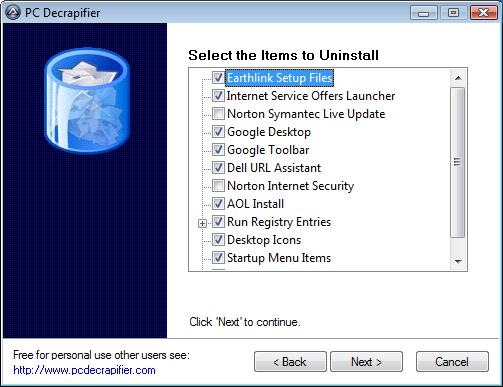
After a computer is purchased, the best thing to do is to clean the house. There is two ways to do the house cleaning - tough way and easy way. The tough way is to go through the list of all installed applications and uninstall them manually. The easy way is to use PC Decrapifier tool to automatically identify and remove all the useless software.
PC Decrapifier is a freeware utility that helps you to clean up the brand-new PC by removing all the trail versions and junk application that come pre-installed on new systems. Here you can view the full list of trail software, browser add-ons and other junk applications PC Decrapifier can detect and uninstall.
You can even run this application on your recently purchased computer to remove the crap applications. When I ran this application on my 1 year old laptop, It identified and uninstalled 5 junk applications.
Download PC Decrapifier v2.0.0 (Indowebster)
Mirror :
http://www.pcdecrapifier.com/files/pc-decrapifier-2.0.0.exe
Minggu, 12 Oktober 2008
Windows XP Shutdown Fast
Windows XP shutdown can be slow from time to time. Windows XP contains all kinds of internal mechanisms that sometimes deliberately slow down your machine. The functions Shutdown, Restart and Switch User illustrate this clearly.
What happens when you shutdown your computer ?
First you need to click the Start button, then click the shutdown button. Windows takes you to a dialog where you need to - again - click shutdown ...
... and it's only then that the waiting starts.
What a pain !
Only few people know that Windows XP offers a powerful alternative that does the shutdown job in half the time.
A Windows XP shutdown icon on your desktop
Right-click an empty space on your desktop
Select the option "new shortcut"
Type "shutdown -s -t 0" (Exactly as shown here, but without the quotes. The last character in the command is a zero.)
Click next
Type a name for the shortcut (e.g. Fast shutdown) and click finish
Now you have a new icon on your desktop. Let's customize it some more.
Right-click the new icon and select properties.
In the dialog box that opens up, click change icon.
You may see a warning message that shutdown.exe contains no icons, just click ok if you see this
Choose a new icon
You are now ready to test your new Windows XP shutdown button. Make sure to close all applications and double-click your new icon to shutdown your computer.
An icon to restart your computer fast on your desktop
Create a new icon like the previous one, but type "shutdown -r -t 0" in the "location of the item" box.
Sumber : SilentGround.org
Membasmi Virus 'Gadis Desa'

Salah satu aksi yang dilakukan virus ini adalah mengubah nama penunjuk jam pada pojok kanan bawah komputer, dari AM dan PM menjadi rieysha. Bagaimana cara membersihkannya? Simak tips di bawah ini.
1. Matikan "System Restore" selama proses pembersihan (Windows ME/XP).
2. Matikan proses virus. Untuk mematikan proses virus anda dapat menggunakan tools KillVB. Silahkan download tools tersebut di alamat ini: http://www.compactbyte.com.
3. Hapus registri yang sudah dibuat/diubah oleh virus. Untuk menghapus registri silahkan download tools FixRegistry berikut: http://www.4shared.com/file/58560496/cad010c5/FixRegistry.html?dirPwdVerified=feea1d94
4. Hapus file induk virus dengan ciri-ciri:
- Ukuran 148 KB
- Icon multimedia
- Ekstensi EXE
- Type file Application
Setelah file berhasil ditemukan, hapus file dengan ciri-ciri seperti di atas. Hapus juga file berikut pada root drive (c:\ atau d:\):
- pesene_seng_gawe.htm (ukuran 22 KB)
- xx pesene_seng_gawe.htm (ukuran 1 KB), xx menunjukan karakter acak
- Autorun.inf
- C:\Puisi.txt
- C:\Windows\Taskman.com
Sumber : www.detik.com
Menghilangkan Virus Rieysha

Rieysha akan memunculkan pesan setiap kali komputer dinyalakan atau pada saat user membuka file berekstensi .TXT, .BAT, .DOC atau .INI, yang salah satu isi pesannya: "Sayang Kapan Kamu Balik Ke Indonesia? Apa Kamu Kembali Dengan Hatimu Yang Dulu?"
Untuk membersihkannya, simak langkah-langkah berikut ini:
1. Matikan System Restore selama proses pembersihan.
2. Matikan proses virus yang sedang aktif dimemori. Untuk mematikan proses ini anda dapat menggunakan tools pengganti task manager seperti "Curr Process", kemudian matikan proses yang mempunyai icon "txt".
3. Perbaiki registry Windows dengan membuat script berikut pada program notepad, kemudian simpan dengan nama repair.inif. Jalankan file tersebut dengan cara: klik kanan repair.inf, lalu klik Install.
Sebaiknya buat file repair.inf di komputer lain yang tidak terinfeksi virus agar virus tidak kembali aktif atau pada program wordpad.
[Version]
Signature="$Chicago$"
Provider=Vaksincom Oyee
[DefaultInstall]
AddReg=UnhookRegKey
DelReg=del
[UnhookRegKey]
HKLM, Software\CLASSES\batfile\shell\open\command,,,"""%1"" %*"
HKLM, Software\CLASSES\comfile\shell\open\command,,,"""%1"" %*"
HKLM, Software\CLASSES\exefile\shell\open\command,,,"""%1"" %*"
HKLM, Software\CLASSES\piffile\shell\open\command,,,"""%1"" %*"
HKLM, Software\CLASSES\regfile\shell\open\command,,,"regedit.exe "%1""
HKLM, Software\CLASSES\scrfile\shell\open\command,,,"""%1"" %*"
HKLM, SOFTWARE\Microsoft\Windows NT\CurrentVersion\Winlogon, Shell,0, "Explorer.exe"
HKLM, SYSTEM\ControlSet001\Control\SafeBoot, AlternateShell,0, "cmd.exe"
HKLM, SYSTEM\ControlSet002\Control\SafeBoot, AlternateShell,0, "cmd.exe"
HKLM, SYSTEM\CurrentControlSet\Control\SafeBoot, AlternateShell,0, "cmd.exe"
HKLM, SOFTWARE\Microsoft\Windows NT\CurrentVersion, RegisteredOrganization,0, "Organization"
HKLM, SOFTWARE\Microsoft\Windows NT\CurrentVersion, RegisteredOwner ,0, "Owner"
HKCU, Control Panel\International, s1159,0, "AM"
HKCU, Control Panel\International, s2359,0, "PM"
HKCU, Software\Microsoft\Internet Explorer\Main, Start Page,0, "about:blank"
HKLM, SOFTWARE\Classes\.sys,,,"sysfile"
HKLM, SOFTWARE\Classes\.doc,,,"word.document.8"
HKLM, SOFTWARE\Classes\.bat,,,"batfile"
HKLM, SOFTWARE\Classes\.ini,,,"inifile"
HKLM, SOFTWARE\Classes\.dll,,,"dllfile"
HKCU, Software\Microsoft\Windows\CurrentVersion\Policies\explorer, NoDriveTypeAutoRun,0x00010001,255
[del]
HKLM, SOFTWARE\Microsoft\Windows\CurrentVersion\run, RunDll
HKLM, SOFTWARE\Microsoft\Windows\CurrentVersion\RunServices, Windll
HKCU, Software\Microsoft\Windows\CurrentVersion\Policies, NoClose
HKCU, Software\Microsoft\Windows\CurrentVersion\Policies\explorer, NoClose
HKCU, Software\Microsoft\Windows\CurrentVersion\Policies\explorer, NoDrives
HKCU, Software\Microsoft\Windows\CurrentVersion\Policies\explorer, NoFind
HKCU, Software\Microsoft\Windows\CurrentVersion\Policies\explorer, NoFolderOptions
HKCU, Software\Microsoft\Windows\CurrentVersion\Policies\explorer, NoRun
HKCU, Software\Microsoft\Windows\CurrentVersion\Policies\explorer, NoViewOnDrive
HKCU, Software\Microsoft\Windows\CurrentVersion\Policies\System, DisableCMD
HKCU, Software\Microsoft\Windows\CurrentVersion\Policies\System, DisableRegistryTools
HKCU, Software\Microsoft\Windows\CurrentVersion\Policies\System, DisableTaskMgr
HKCU, Software\Microsoft\Windows\CurrentVersion\Explorer\Advanced, ShowSuperHiden
HKCU, SOFTWARE\Classes\exefile, Default
Catatan:
Pada saat menyimpan file repair.inf pada program wordpad, pada kolom "save as type" pilih "Text Document".
4. Hapus file virus dengan terlebih dahulu menampilkan file yang tersebunyi agar proses pencarian file lebih optimal. Jika folder option atau drive master (c:\) belum tampil, logoff komputer terlebih dahulu.
C:\Program Files
- RunDll.exe
- KenanganJogja.exe
C:\Jadwal_Manggung.exe
C:\PesanBuatKekasih.bat
C:\rieysha.exe
C:\Windows
- pesan.txt
- rieysha.exe
- Rahasiaku_Pacarku.exe
- DaftarHacker_Blacklist.exe
- Cerita_Panas_Mendebarkan.exe
- Pesanku.doc
- SuratCinta.exe
- Autorun.inf
- RieyshaAnakJogja.exe
- Sampah.txt
- notepad.exe
C\WINDOWS\system
- psene_seng_gawe.rtf
- rieysha.exe
- Jogja_virus_maker.exe
D:\Puisi.txt
E\CatatanTugas.exe
H:\CeritaDewasa.exe
G:\CatatanML.exe
K\CeritaML.exe
5. Cari file rieysha_anak_jogja.txt, kemudian rename menjadi MSVBVM60.DLL, setelah itu copy file tersebut ke direktori "C:\Windows\system32".
6. Ubah nama file "C:\Windows\bacaan_anak_tk.txt" atau "C:\Windows\ bacaanHot.txt" (pilih salah satu) menjadi C:\Windows\notepad.exe. Kemudian ubah juga nama file "C:\Windows\ReadMe.txt" menjadi "C:\Windows\cmd.exe"
7. Untuk pembersihan optimal, gunakan antivirus yang sudah mampu mendeteksi dan membasmi virus ini dengan baik.
Sumber : www.detik.com
Membersihkan Virus Donal Bebek

Bulu Bebek menyembunyikan folder/subfolder pada flash disk dan membut file duplikat sesuai dengan nama folder/subfolder tersebut untuk mengelabui user. Untuk membersihkannya, simak langkah berikut ini:
1. Sebaiknya putuskan komputer yang akan dibersihkan dari jaringan (jika terhubung ke Local Are Network/LAN).
2. Disable "System Restore" untuk sementara selama proses pembersihan berlangsung (jika menggunakan Windows ME/XP).
3. Matikan proses virus yang sedang aktif di memori, untuk mematikan proses virus ini gunakan tools pengganti taks manager seperti procexp, kemudian matikan proses virus yang mempunyai icon "Folder".
4. Repair registry Windows yang sudah diubah oleh virus. Untuk mempercepat proses tersebut salin script dibawah ini pada program notepad kemudian simpan dengan nama repair.inf. Jalankan file tersebut dengan cara:
* Klik kanan repair.inf
* Klik Install
[Version]
Signature="$Chicago$"
Provider=Vaksincom Oyee
[DefaultInstall]
AddReg=UnhookRegKey
DelReg=del
[UnhookRegKey]
HKLM, Software\CLASSES\batfile\shell\open\command,,,"""%1"" %*"
HKLM, Software\CLASSES\comfile\shell\open\command,,,"""%1"" %*"
HKLM, Software\CLASSES\exefile\shell\open\command,,,"""%1"" %*"
HKLM, Software\CLASSES\piffile\shell\open\command,,,"""%1"" %*"
HKLM, Software\CLASSES\regfile\shell\open\command,,,"regedit.exe "%1""
HKLM, Software\CLASSES\scrfile\shell\open\command,,,"""%1"" %*"
HKLM, SOFTWARE\Microsoft\Windows NT\CurrentVersion\Winlogon, Shell,0, "Explorer.exe"
HKLM, SYSTEM\ControlSet001\Control\SafeBoot, AlternateShell,0, "cmd.exe"
HKLM, SYSTEM\ControlSet002\Control\SafeBoot, AlternateShell,0, "cmd.exe"
HKLM, SYSTEM\CurrentControlSet\Control\SafeBoot, AlternateShell,0, "cmd.exe"
HKLM, SOFTWARE\Microsoft\Windows\CurrentVersion\Explorer\Advanced\Folder\SuperHidden, UncheckedValue,0x00010001,1
HKLM, SOFTWARE\Microsoft\Command Processor, AutoRun,0,
HKLM, SOFTWARE\Microsoft\Windows\CurrentVersion\Explorer\Advanced\Folder\Hidden\SHOWALL, CheckedValue, 0x00010001,1
HKLM, SOFTWARE\Microsoft\Windows\CurrentVersion\Explorer\Advanced\Folder\Hidden\SHOWALL, DefaultValue, 0x00010001,2
HKCU, Software\Microsoft\Command Processor, AutoRun,0,
[del]
HKCU, Software\Microsoft\Windows\CurrentVersion\Policies\System, DisableRegistryTools
HKCU, Software\Microsoft\Windows\CurrentVersion\Policies\System, DisableTaskMgr
HKCU, Software\Microsoft\Windows\CurrentVersion\Policies\Explorer, NoFolderOptions
HKCU, Software\Microsoft\Windows\CurrentVersion\Policies\Explorer, NOFind
HKCU, Software\Microsoft\Windows\CurrentVersion\Policies\Explorer, NORun
HKCU, Software\Microsoft\Windows\CurrentVersion\Policies\WinOldApp
HKLM, SOFTWARE\Microsoft\Windows NT\CurrentVersion\Image File Execution Options\PAYXX.exe
HKCU, Software\Microsoft\Windows NT\CurrentVersion\Winlogon, Shell
HKLM, SOFTWARE\Microsoft\Windows\CurrentVersion\Explorer\Advanced\Folder\Hidden\HideFileExt
HKLM, SOFTWARE\Microsoft\Windows\CurrentVersion\Explorer\Advanced\Folder\Hidden\ShowFullPath
HKLM, SOFTWARE\Microsoft\Windows\CurrentVersion\Explorer\Advanced\Folder\Hidden\ShowFullPathAddress
HKLM, SOFTWARE\Microsoft\Windows\CurrentVersion\Explorer\Advanced\Folder\Hidden\SuperHidden
HKCU, Software\Microsoft\Windows\CurrentVersion\Policies\Explorer, NoFolderOptions
HKCU, Software\Microsoft\Windows\CurrentVersion\Policies\System, DisableRegistryTools
5. Cari dan hapus file duplikat yang dibuat oleh virus. Untuk mempercepat proses pencarian sebaiknya gunakan fungsi "Search Windows" dengan terlebih dahulu menampilkan file yang disembunyikan.
Jika Folder Option belum muncul, sebaiknya LogOff komputer terlebih dahulu kemudian tampilkan file yang tersembunyi. Setelah file duplikat ditemukan, hapus file yang mempunyai ciri-ciri:
- Menggunakan icon Folder
- Ukuran file 53 KB
- Ekstensi EXE
- Type File "Application"
Berikut cara menampilkan file/folder yang disembunyikan dengan menggunakan ATTRIB:
- Klik "Start"
- Klik "Run"
- Ketik "CMD", kemudian tekan tombol "Enter"
- Pindahkan posisi kursor ke drive Flash Disk
- Kemudian ketik perintah ATTRIB –s –h –r /s /d kemudian tekan tombol "enter"
Sumber : www.detik.com
Selasa, 30 September 2008
Automatic Login for Windows Vista
If you want Vista to automatically log you in each time you start the computer up heres how you go about that & it isn’t that hard to do.
Open the UAC (or User Account Control) in Vista, go to the start/search area of Vista, and type in NETPLWIZ. Once you get there:
UNcheck the box next to “Users should enter a username and password to use this computer”, and then press OK.
Type the username and password for the user you want to automatically logon to Windows Vista when it boots up and press OK
Reboot the computer
It’s that simple. Vista will remember the username and password, and you won’t have to log in every time you boot the computer.
Photoshop Top Secret DVD 1-5, PLUS Professional DVD Covers and DVD Case Labels

This student-friendly home study course includes four DVD-ROMs with over 16 gigabytes of video tutorials and project files. It also comes with a full-color gallery book (printed, not pdf) that shows the end result of each project in the course. You can look, learn, practice, and master these advanced techniques wherever you may be, without the need for expensive classes or tutors. Create Posters, Movie Covers, Surreal Graphics and More!
The course will teach you how to become the ultimate Photoshop« "black belt" for fun and/or profit. You'll learn how to create top-level special effects for eye-catching movie posters, album covers, book jackets, brochures, mailing pieces, magazine covers, article illustrations, and a tremendously wide range of print ads and Web site graphics.
Little tip for this set folks....this set of tuts are in flash, java and html and maybe other formats mixed in...That is why it could not be converted in any way to make smaller. You can just download and burn to DVD. There are no exe files in this dvd set...only one "StartHere.html" menu file per DVD with a menu of each tut. Pretty kewl actually. This set is a damn nice set IMO!!

Movie Poster Design I
Create a popular people montage seen
on many movie posters.
Movie Poster Design II
Take an ordinary house and turn it into a
Sci-fi Movie Poster.
Movie Poster Credits
Tips and tricks on creating a real “Credit Block�
for movie posters.
Dark Faces
How I created my creepy Image that has been
in Magazines and Ads.
Breaking Apart
Create the illusion that a face is
falling apart.
Dream Scene Montage
Create an elephant with wings and
place it into a futuristic world.
Stone Portrait
Create a “Stone Bust� out of a portrait
for a killer special effect.
Surreal Images
Create a creamy foggy mist over
water and rocks.
Dream Skin
Create a fantasy woman with henna
art and dream skin.
Special Effects
Learn how to create orbs, fireballs
and jellyfish like creatures.
- - - - - - - - - - -
DVD 2
Painting a Portrait
Digitally paint a portrait from a
photographic reference.
Swapping Faces
How to take the face from one photo
and place it into a completely different one.
Pop Art
Turn a Photograph into artwork
that was popular in the mid 1950’s.
Applying Tattoos
How to apply henna and tattoos to skin.
Masking Fur
Seamlessly remove the background
from furry animals.
Vanishing Point
What Vanishing Point is and how
to edit images with perspective.
Web Graphics
Learn how to create commonly
used web graphics and screen shots.
Shattered Type
Create the illusion that text
is being shattered like glass.
Flower Greeting Card
Use the vector tools in Photoshop to
create an elegant looking Greeting Card.
Creating DVD Covers
Mark shows you exactly how he created
the Photoshop Top Secret DVD covers.
- - - - - - - - - - - - - -
DVD 3
Flying out of Bounds
Create the classic “out of bounds� effect
with a very cool masking trick.
Reaching out of Bounds
Creating the illusion of arms and
hands reaching out of a picture frame.
Chocolate Milk Frog
How to make a frog covered in chocolate.
Covered with Wax
Choose an object and cover it
with melting wax.
Grunge Look
Create a unique grunge background
that can be used for almost anything.
Square Fruit
Play with mother nature by changing
the shape of fruit.
Invisible Man
How to make a person vanish from
their clothing.
Metal Collage
How to create a Robot with pieces of a
Photo and then place it into another world.
Morphing Creatures
Morph animals and reptiles together
to create interesting creatures.
Using Layer Comps
How to create multiple layouts in
one Photoshop file using Layer Comps.
- - - - - - - - - - - - -
DVD 4
Vector Art Portrait
Turn a Photograph into beautiful
vector art.
Dreamy Background
Create Sci-fi looking spiral
backgrounds.
Liquid Metal
The ultimate Liquid metal technique
that can be applied to text and objects.
Smoke
Create Psychedelic and Natural Smoke
to incorporate into your artwork.
Soap Bubbles
Use soap bubbles to add flair to
your projects.
Water Bubbles
Use these water bubbles to infuse
imagination into your projects.
Underwater Scene
Create an underwater illusion with
just the tools in Photoshop.
Swap Animal Skin
Take skin from one animal and
place it over another.
Stylized Character
Turn a sketch into colorful art.
Masking Mastery
Special video that explains many masking
techniques used by the pros.
- - - - - - - - - - - - -
DVD - 5 (BONUS Pack)
Format filenya adalah .txt yang berisikan 165 link RAPIDSHARE. Total sizenya adalah kurang lebih 16GB. Maaf belum bisa di lokal-in, soalnya besar banget total sizenya. Tapi karena menurut saya sangat bagus, worth untuk di download.
Klik disini untuk download list file nya.
Password : SilentGround.org
Credits goes to Str|k3r @SilentGround.org for this excelent dvd.
Reduce Vista Boot Time with Advanced Boot Options
If your computer has a multiple core CPU , then you may try this small tip. With this, what you do is that you change the number of Processors that will be used during the boot up time. Multiple Core CPU's (Core Duo or Quad Core) may not actually increase the speed. It will only increase the number of processor cores which would be involved in the process. This is known to decrease the boot time.
I have tried it, and it did shave a few seconds off my boot time. See how much it helps you. If it doesn't help you, you can always reverse the changes.
Type msconfig in Vista's Start Menu search bar and hit Enter.
Select the Boot Tab and click on the Advanced button.
Check the Number of processors box and see the drop down menu.
Here select 2 or 4 as the case may be.
Click OK > Apply > OK > Reboot.
Now from the next reboot onwards you may see a difference.
To reverse the change, simply uncheck the Number of processors box, and Click OK > Apply > OK > Reboot.
Credits goes to Warez_Biggalo @SilentGround.org for this tips.
Selasa, 29 Januari 2008
To Create and Send Email in a Hurry
In a hurry to create and send an email? Try this...
- If you're using Explorer 4.x or Communicator 4.x press CTRL+O
If you're using Explorer 3.x, Navigator 2.x or Navigator 3.x press CTRL+LIf you're using Firefox press CTRL+L
- Type "mailto:" followed by the email address (or addresses separated by commas)
Example:- To send email to "linus12a@linxlunx.info" type:
mailto:linus12a@linxlunx.info
- Press ENTER

How to Display Your Web Logo on the Address Bar and in The Favorites?
Want to make your web site standout in crowded favorites lists in browsers and address bars? How about displaying your logo next to links to your site.
Once you have an icon file with your logo, you're ready to take the final step. Following methods will work in Explorer 5.x and higher without having any negative effects on other browsers.
Method 1
This is the easiest method to implement and it will work regardless of the particular page on your site users choose to add to their favorites list. Don't worry if you don't have access to your web site root; take a look at the next method.
If you have access to the root of your web site, simply save your icon file as "favicon.ico" there. For example, if your web site is "www.alpha.com", your icon file should be available at "www.alpha.com/favicon.ico". The web browser will look for favicon.ico whenever your site is added to the favorites list and if it is found at the root of your web site, the icon will appear next to the link to your site.
Method 2
If you don't have access to the root of your web site, you have to add the following tag to your web page so that the browser will know where to look for your icon. Unlike before, this time you can save the icon under any name ending with ".ico" We'll use the name "logo.ico" and assume that your web site is under the directory "~your_directory".

 By the way, you can specify multiple logos for multiple pages using the second method. Simply save your icons using unique names, such as logo1.ico, logo2.ico, logo3.ico for example, and replace "logo.ico" in the above HTML code with the name of the icon you want to use for any particular page.


